PatternSmith User Guide
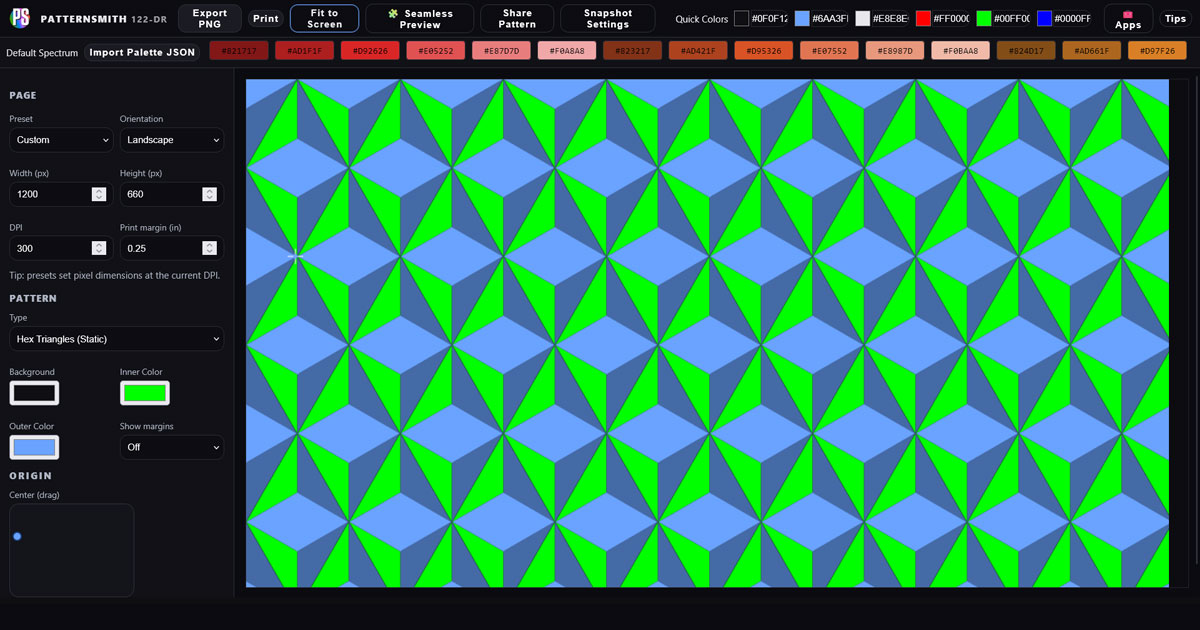
PatternSmith interface preview

Green Macaroni User Guide

PatternSmith

Create seamless repeating patterns, material surfaces, geometric systems, organic textures and SVG-based artwork directly in your browser. PatternSmith combines 139 pattern engines with palettes, presets, live controls, seamless testing, global texture effects and high-resolution PNG export.

Quick start

You can make a useful seamless pattern in about a minute. Start with a preset, then change only the controls that matter to you.

1Pick a pattern.Open the Pattern Library, browse a category or search by name, then click a thumbnail.
2Try a preset.Most engines offer their own presets. A preset is the fastest way to understand what that engine can do.
3Change the colors.Use the pattern color controls, Quick Colors, or import a palette and choose an active-palette color mode where available.
4Adjust scale and structure.Use the selected pattern's controls for density, size, spacing, direction, randomness, depth or other engine-specific behavior.
5Check the repeat.Open Seamless Preview and look at the pattern as a tiled field instead of a single canvas.
6Export PNG.PatternSmith renders a clean PNG without the on-screen origin marker or print-margin guides.
Best beginner workflow: choose a pattern, choose a preset, change two or three controls, check Seamless Preview, then export. You never need to understand every control before making something useful.

PatternSmith in the Green Macaroni ecosystem

PatternSmith is one of the main artwork generators in Green Macaroni. Its patterns can become backgrounds, textures and design elements in the rest of the workflow.

The workspace

The interface keeps the canvas in the center and puts pattern-specific controls in a single tool panel.

Top barExport PNG, Fit to Screen, Seamless Preview, Snapshot Settings, Quick Colors, Apps and Tips.
Palette barShows the active palette and provides Import Palette JSON plus draggable/clickable palette chips.
Tools panelPage setup, Pattern Library, global colors, Origin, the selected pattern's controls, Texture Overlay and Paint Stroke Overlay.
CanvasThe current PatternSmith artboard. It updates as controls change and is the source for your final export.

Fit to Screen

Fit to Screen keeps the whole artboard visible within the available workspace. PatternSmith starts in fit mode, which is usually the easiest way to work on large tiles.

Responsive rendering

High-detail engines may use lighter preview work while you interact and then complete a cleaner render afterward. This keeps large or complex patterns usable without changing the final export quality.

Pattern Library

The current build contains 139 pattern engines. The visual Pattern Library is the fastest way to find them.

  • Browse by category: Lines, Stripes & Ribbons; Geometric & Optical; Materials & Textures; Organic & Natural; Decorative & Playful; and SVG Tiling.
  • Search: typing in the Pattern Library searches pattern names, internal IDs and category names.
  • Preview thumbnails: cards show a representative preview before you switch engines.
  • Selected pattern: your current engine is visibly highlighted.
SlowerSVG

The Slower badge identifies heavier engines that can take more time to customize or redraw. The SVG badge identifies engines that work with vector artwork. The SVG Tiling category is a cross-category view, so those engines can also belong to a main visual family.

Useful habit: when learning PatternSmith, explore by preset rather than moving every slider from its default. The presets show the intended range of each engine much more quickly.

How pattern controls work

Every pattern has its own control set, but the interaction rules stay consistent.

Presets

Many engines begin with a Preset menu. Choosing a named preset changes a coordinated group of colors and geometry settings. Once you edit those values, the engine generally moves into a custom state.

Sliders and number fields

Sliders are live. Number fields are designed so you can type a complete value without the app fighting you mid-entry. A typed number commits when you press Enter, change the field, or leave it.

Seeds and randomization

Procedural engines often include a seed or Randomize/Shuffle control. The seed changes the generated arrangement while keeping the rest of your settings stable. This is useful when you like the style but want a different distribution.

Color modes

Depending on the engine, you may see fixed colors, Tone on Tone, duotone, tritone, rainbow, active-palette cycling, random active palette, custom multi-color mixers or surface-specific color systems.

Automatic seamless math

Some engines expose a seamless toggle or use lattice-safe angles. When required, PatternSmith can snap canvas dimensions or repeat periods so the exported tile matches the actual mathematical repeat.

Do not panic if the canvas dimensions change: on certain lattice and tile engines that is intentional. PatternSmith is resizing the artboard to a valid repeat period.

Page, canvas and origin

The PAGE section controls the artboard. ORIGIN controls where applicable pattern geometry radiates or aligns from.

Page presets

PresetBehavior
CustomEnter Width and Height directly in pixels.
Square 2048Sets a 2048 × 2048 pixel square.
Letter8.5 × 11 inches at the current DPI.
Legal8.5 × 14 inches at the current DPI.
Tabloid11 × 17 inches at the current DPI.
18×2418 × 24 inches at the current DPI.

Portrait and Landscape swap the page orientation. DPI affects how inch-based presets are converted to pixels. The print margin is a guide only and is not baked into PNG exports.

Origin

Drag the dot in the origin pad, snap it to Center or any corner, or choose Click canvas and click directly on the preview. Patterns that use the origin update around that point.

Colors, palettes and Quick Colors

PatternSmith gives you three overlapping color systems: global pattern colors, a reusable active palette and a seven-slot Quick Colors tray.

Global pattern colors

Background, Inner Color and Outer Color stay visible near the top of the tools panel. Many engines use them directly; more complex engines may add their own additional color fields.

Active palette

The palette bar starts with the Default Spectrum. Choose Import Palette JSON to load palette data. PatternSmith accepts Palette Grabber-style JSON, arrays of hex colors, objects with a colors array, and plain-text lists of hex codes.

  • Click a palette chip: applies it to the last color field you used when possible, and copies the hex value to the clipboard.
  • Drag a palette chip: drop it directly onto a color field.
  • Active-palette modes: many pattern engines can cycle or sample the imported palette automatically.

Quick Colors

The seven Quick Colors in the top bar are independent reusable color slots. Each slot has a color chip and an editable HEX field, and its chip can be dragged onto PatternSmith color fields.

Palette Grabber pairing: this is one of the most direct app-to-app workflows in Green Macaroni. Build the palette in Palette Grabber, import its JSON here, then switch supported patterns to an active-palette mode.

Seamless Preview

A single tile can look convincing while still having an obvious seam. Seamless Preview shows the repeat as a field so you can test it before export.

  • Click 🧩 Seamless Preview to open the tiled preview.
  • Use − and +, the scale slider, the numeric scale field, or quick presets from 5% through 200%.
  • Fit scales the repeated field to the available view.
  • ⛶ toggles full-screen preview.
  • The preview control panel is draggable and remembers its position.
  • Press Ctrl + H while the preview is open to hide or show that control panel.
The preview is intentionally optimized for speed. It can look more pixelated than the final PNG. Your export is rendered at the proper output resolution.

True repeat period

For engines that declare a specific mathematical tile period, PatternSmith uses that repeat period for export. This prevents an apparently seamless preview from turning into a cropped non-tileable PNG.

Global Texture and Paint Stroke overlays

These effects appear after the selected pattern's own controls and can be applied to almost any engine.

Texture Overlay

Enable a procedural Noise or Pebbled texture, choose whether it affects the pattern, the background, or both, then set opacity, scale, blend mode and seed. Noise adds density/strength/coarseness controls; Pebbled adds size, roughness, depth and softness.

Paint Stroke Overlay

Add a seamless brush-stroke layer over the pattern. Controls include brush shape, curved-stroke mix, blend mode, opacity, scale, density, stroke length/width, direction, brush load, dry-brush breakup, edge wobble, relief, bristle detail, knife ridges, lighting, colors and seed.

These overlays are global: once you understand them on one pattern, you can use the same effect-building logic on the rest of the library.

SVG artwork and vector tiling

PatternSmith can repeat SVG artwork as part of a seamless pattern, either from the built-in SVG Library or from your own files.

Built-in SVG Library

SVG-capable engines provide a Library button. The library can be searched by words such as arrow, dots or animal, and its categories can be browsed directly.

Upload your own SVG

Use Upload inside the relevant SVG slot. PatternSmith reads usable SVG path geometry and exposes controls such as color, opacity, scale, blend mode, density and offset depending on the engine.

SVG Stamp LatticeRepeats vector artwork on a lattice and can export the true tile as vector SVG as well as through the normal PNG exporter.
SVG Scatter / SVG 3D ScatterScatters uploaded or library artwork with position, scale and rotation; the 3D version adds depth and lighting.
SVG Stacked ScatterLocks separate SVG components together as one multi-color object, useful for artwork such as a berry plus separate leaves.
Braided Hex Lattice / Maze TilesUse SVG geometry inside structured interlocking or tessellated repeat systems.

Vectorwright is the companion app when you need to turn source artwork into clean SVGs specifically for use here.

Special pattern workflows worth knowing

Some engines go beyond the normal preset-and-slider pattern model.

Paper Drift

The supplied build includes Paper Drift revision 03. It can generate Folded ribbons, Icebergs and Ice floes. Ribbon and iceberg undersides can be Curved, Angular, Angular facets or Straight. Controls cover underside/slab depth, edge irregularity, proportion variation, side tint, folded faces, shadows, length, thickness, direction, spacing, stagger, shape variation, position variation and a stable arrangement seed. Presets are grouped into Ribbons, Icebergs & ice floes, and Paper folds.

Tartan Plaid

Tartan Plaid includes its own searchable preset browser with categories and favorites. It supports a stripe builder for warp and weft structures, plus JSON-spec editing for more explicit tartan definitions.

Material engines

PatternSmith includes deep surface generators for handmade paper, paint, leather, wood, marble, stone, glitter, fabric, knitted/crochet structures, chain mail, hammered metal, diamond plate, carbon fiber, bricks and more. These engines often expose lighting, relief, surface detail and material-specific controls rather than simple geometry sliders.

Watercolor Washes

Watercolor Washes is one of the heavier engines. It uses soft transparent blooms and pigment effects and can also export its tile as SVG using blend modes and SVG filters.

Export, snapshots and reproducibility

PatternSmith separates the finished artwork from the information you need to recreate it.

Export PNG

Export PNG renders a clean version of the pattern and downloads it with a unique filename containing the pattern ID, output dimensions and timestamp. Print-margin guides and the origin marker are never baked into the exported artwork.

Snapshot Settings

Snapshot Settings creates a PNG reference sheet of the current setup. It records the current pattern, canvas, DPI, margin, global colors, origin and the visible pattern-control values. This is useful when you want a human-readable recipe for recreating a pattern later or sharing settings with someone else.

Stable seeds

When an engine uses a numeric seed, keeping that seed preserves the procedural arrangement. Change the seed when you want a new arrangement without rebuilding the rest of the design.

For important work, save both: export the finished PNG and also take a Snapshot Settings image. One preserves the artwork; the other preserves the recipe.

Using PatternSmith on a phone or tablet

The mobile interface rearranges the same core tools instead of removing them.

  • ☰ Tools opens the main tool panel.
  • Save PNG provides a direct mobile export button.
  • More opens Quick Actions for Export PNG, Fit to Screen, Seamless Preview, Snapshot Settings, Apps and Tips.
  • A separate TOOLS tab can reopen the panel when space is tight.
  • Landscape and smaller screens use compact controls, but the pattern settings and exports remain the same.

Full Pattern Library catalog

The descriptions below are based on the current PatternSmith build. Open a category to browse its engines. Use your browser's Find command if you already know a pattern name.

Lines, Stripes & Ribbons26 in the Pattern Library
Directional systems, line fields, contour structures, ribbons, stripes and woven movement.
Beach Towel - SeamlessA simple customizable graphic stripe generator, inspired by repeating textile patterns.
Dash Lines - SeamlessParallel dashed lines with editable dash size, spacing, weight, corner roundness, color rhythm, staggering, and lattice-safe seamless angles.
Distressed Chevron - SeamlessSeamless chevrons with built-in safe angles and worn, distressed surface character.
EVH StripesA non-seamless stripe engine for bold, chaotic, Eddie Van Halen “Frankie” guitar-inspired surface graphics.
Flow Field Engraving - SeamlessTiny engraved marks following invisible currents for seamless etched line texture.
Flow Zones - SeamlessOrganic seamless beaded-curtain flow zones with swelling forms, narrow pinches, subtle wandering, active-palette colors, rainbow modes, and transparency.
Fractured Line Scatter - SeamlessLoose angular line fragments create a dry, etched, energetic surface texture.
Leaf Tracery Flow - SeamlessFlowing curvilinear lines with leaf-like structures and soft moving botanical designs.
Optical Stripe Flow - SeamlessSeamless op-art stripe fields with optical squeeze lenses, sine-wave motion, active-palette colour modes, and poster-ready band presets.
Organic Lines - SeamlessLoose organic linework for natural movement, hand-drawn texture, and flowing repeating patterns.
Organic Maze (Parallel) - SeamlessParallel organic maze paths for flowing channels, stripes, and natural line systems.
Organic Maze - SeamlessA winding organic maze field with natural corridors and seamless abstract structure.
Paper Drift - SeamlessStretched folded ribbons, angular icebergs, and broken ice floes inspired by Liam Hayes’s 2014 illustration, with varied outlines, shaded sides, open space, and seamless repetition.
Prism Fault Lines - SeamlessInterlocking prism plates with adjustable gaps, bevels, shadows, and color modes.
Radiating RaysClassic sunburst rays with editable gradients, outlines, color families, and bold impact.
Random Lines - SeamlessSeeded translucent line fields with single-color, rainbow, and eight-color palette modes, plus controllable weight, opacity, angle, length, clustering, and seamless wrapping.
Solar RibbonsUndulating solar rays for retro album-cover and psychedelic pattern design.
Spiky Zigzags - SeamlessSharp energetic zigzags with lattice-safe angles and graphic repeat options.
Threads - SeamlessSeamless thread textures for fabric, stitching, woven color, and fine strand detail.
Tidal Harmonic Field - SeamlessOrganic drifting waves that create slow seamless tension with harmonic line movement.
Topographic Contours - SeamlessWrapped contour lines for maps, fingerprints, sand, agate, woodcut, and terrain.
Watercolor Ribbons - SeamlessFlowing watercolor ribbons with soft pigment drift and layered transparent movement.
Wavy Lines - SeamlessSeamless wavy lines on a lattice framework with expanded color, spacing, and flowing line controls.
Wavy Ribbons - SeamlessRibbon bands made from paired waves, shifted and filled for smooth woven movement.
Woven Ribbon Grid - SeamlessA woven over-under ribbon grid with seamless structure and editable color rhythm.
Zebra Stripes - SeamlessOrganic seamless zebra-hide slits with stronger wobble, tapered points, strong diagonal character, active-palette colors, rainbow modes, and transparency.
Geometric & Optical55 in the Pattern Library
Tessellations, grids, optical illusions, isometric structures and clean graphic geometry.
Aperiodic Monotile - SeamlessSpectre-inspired monotile repeats for interlocking geometric texture and unusual tiling.
Circuit Board - SeamlessSeamless PCB-inspired trace routing with vias, pads, bus lanes, optional chip footprints, depth and sci-fi glow controls.
Color Facets - SeamlessBright, irregular color facets inspired by Liam Hayes’s 2014 illustration, with flat graphic triangles, joined shapes, custom colors, active palettes, and seamless repetition.
Concentric ShapesConcentric circles, squares, and forms for simple graphic targets and bold repeats.
Cumulus Clouds - SeamlessRagged, wispy cloud silhouettes with grey-to-transparent shadow washes or white-to-transparent highlights. Sixteen presets, opening with Cloudscape on #95BDE6 blue, with layered Cloud lines, horizon-like or full-repeat bands, even vertical distribution, windswept profiles and a broad bottom-to-transparent fade. Open the illustrated Cumulus Clouds guide.
Pine Needles - SeamlessLayered evergreen sprigs with broad or wispy needles, connected side branches, tapered stems and compact shaded bud fans nestled among the needles. Fourteen presets and editable shape, color and shading. Open the illustrated Pine Needles guide.
Spectral Veils - SeamlessGlowing translucent ribbon meshes with flowing folds, angular webs, custom colors and active palettes. Open the illustrated Spectral Veils guide.
1980s Design Party - SeamlessEight Memphis motif types with seeded arrangements, custom colors and active palettes. Open the illustrated Design Party guide.
Facet Pinwheels - SeamlessThree-plane folds or entropic shards with uneven facet sizes and clustered splinters. Twelve presets, editable lighting and flat colors. Open the illustrated Facet Pinwheels guide.
Paper Quilling - SeamlessRaised paper coils, teardrops and floral filigree. Eight presets, three arrangements and adjustable strip width, curl tightness, depth and shadow. Open the illustrated Paper Quilling guide.
Feathered Fans - SeamlessOverlapping feather fans with silk shading, fine barbs and optional peacock eyes. Eight presets and adjustable opening, fullness and color placement. Open the illustrated Feathered Fans guide.
Cloisonné Inlays - SeamlessFlowing enamel cells with metallic edges, surface relief and etched contours. Eight presets, editable wire color and openwork options. Open the illustrated Cloisonné Inlays guide.
Inkblot Damask - SeamlessMirrored botanical ink with original spaced ornaments and a connected weave. Fifteen presets with adjustable overlaps, direction, ornament rotation, branching, symmetry and ink spread. Open the illustrated Inkblot Damask guide.
Phyllotactic Gardens - SeamlessSeed-head spirals with petals, diamonds and scales. Ten presets and adjustable divergence, twist and shading. Open the illustrated Phyllotactic Gardens guide.
Starcut Screens - SeamlessStar rosettes and polygonal links form decorative pierced screens. Eight presets, opening inversion and clipped bevel shading. Open the illustrated Starcut Screens guide.
Suspended Lace - SeamlessHanging curves form scalloped nets, layered canopies and beaded strands. Eight presets and metallic or flat finishes. Open the illustrated Suspended Lace guide.
Bubble Packing - SeamlessSeeded circles fill the spaces between larger bubbles. Eight presets with enamel, pearl, flat and ring finishes. Open the illustrated Bubble Packing guide.
Magnetic Filings - SeamlessTiny needles, dashes and grains align with magnetic-style poles, vortices and currents. Eight presets and metallic or flat finishes. Open the illustrated Magnetic Filings guide.
Moiré Looms - SeamlessLayered line screens reveal broad waves, ghost forms and interference lattices. Eight presets and three views. Open the illustrated Moiré Looms guide.
Lenticular Ribs - SeamlessRaised ribs, folded waves and nested diamonds. Eight designer presets and directional surface lighting. Open the illustrated Lenticular Ribs guide.
Frost Ferns - SeamlessBranching crystalline fronds, fine window frost and six-armed rosettes. Eight designer presets and three surface finishes. Open the illustrated Frost Ferns guide.
Resonance Fields - SeamlessSymmetrical loops, pinched curves and dotted paths from harmonic interference. Four field families, four path finishes and eight designer presets. Open the illustrated Resonance Fields guide.
Interlaced Knots - SeamlessContinuous colored ribbons with alternating over-and-under crossings, rounded or angular bends, outlines and crossing depth. Eleven presets, including Gothic Weave, Diagonal interlace and Solomon’s Knot. Open the illustrated Interlaced Knots guide.
Triangle Blocks - SeamlessTriangle pairs build squares, blocks and larger fields. Thirteen presets from quiet translucent veils to stars, pinwheels, diamonds, woven bands and patchwork. Open the illustrated Triangle Blocks guide.
Abstract Art - SeamlessAll-over seamless patterns or static poster art, with seven geometric styles, nine designer presets, eight-color palettes, 300% motif scale and rotation chance. Arches, circles, Bauhaus blocks, angular collage, desert scenes and Angular Intersections. Open the illustrated Abstract Art guide.
Metal Grilles - SeamlessPerforated brushed metal with round, hexagonal and rounded-slot openings, shaded rims and optional fine mesh or transparent cutouts. Eight presets. Open the illustrated Metal Grilles guide.
Brushed Steel - SeamlessFine directional scratches and metallic sheen, with independent grain, reflection, contrast and color controls. Eight metal finishes. Open the illustrated Brushed Steel guide.
Simple Lines - SeamlessUniform solid, dashed, dotted, zigzag, scratchy and scribbled parallel lines with angle, spacing, thickness, opacity and transparent backgrounds. Ten subtle presets. Open the illustrated Simple Lines guide.
Folded Tiles - SeamlessPaired folded panels with real curved outlines, whale-tail lobes, movable peaks, custom colors and optional relief. Includes eight presets and the original shaded treatment. Open the illustrated Folded Tiles guide.
Tri-Spike Lattice - SeamlessAlternating three-arm motifs, shaded triangular planes and a continuous triangle-to-hexagon morph. Eleven presets, independent arm colors, optional 3D spike facets, adjustable arm geometry, 1–8 Custom colors, Active palette colors and transparent export. Open the illustrated Tri-Spike Lattice guide.
Chromatic Mesh - SeamlessRaised diamond lattices and beveled studs with independent flowing color fields, directional lighting, twelve presets, 1–8 Custom colors and Active palette support. Open the illustrated Chromatic Mesh guide.
Grain Facets - SeamlessScattered triangles, curved tiles, petal weaves and fitted irregular facets with directional grain fades or smooth shading. Eight presets, 1–8 Custom colors, Active palette colors and transparent export. Open the illustrated Grain Facets guide.
Prismatic Glass - SeamlessFind Prismatic Glass under Geometric & Optical. Curved glass shards, beveled arcs, rainbow iridescence, flat mosaics and etched outlines. Explore eleven presets, 1–8 Custom colors, Active palette colors, edge-free finishes and transparent linework. Open the Prismatic Glass guide.
Play Blocks - SeamlessFind Play Blocks under Geometric & Optical. Pick from ten geometric motifs, build independent tiles, repeating groups or connected compositions, then explore color and transparency with an optional layout lock. Open the Play Blocks guide.
Liquid Contours - SeamlessFind Liquid Contours under Geometric & Optical. Filled optical bands form flowing channels and closed islands. Explore turbulence, island size, pinching, multicolor bands and transparency. Open the Liquid Contours guide.
Tubes - SeamlessFind Tubes under Geometric & Optical. Smooth wandering paths form loops, crossings and optional joined networks. Explore editable colors, colorful sections, shading, shadow color and transparent PNG export. Open the Tubes guide.
Interlocking Waves - SeamlessFind Interlocking Waves under Geometric & Optical. Explore woven bands, layered waves, rounded interlocks and curling crests, with nested lines, solid bands, crossing clearance, editable colors and transparency. Open the Interlocking Waves guide.
Triangle Mosaic - SeamlessFind Triangle Mosaic under Geometric & Optical. Half-square and quarter-square triangles create shuffled patchwork, diagonal bands, chevrons and repeating blocks. Adjust motif size, neighbor alignment, solid-square chance, colors, outlines and gaps. Open the Triangle Mosaic guide.
Sway - SeamlessFind Sway under Geometric & Optical. Rounded Lobes, Tapered Ribbons and Soft Steps use matched complementary curves. Adjust width, sideways curve depth, pinch, offset and gap, then choose editable colors, the active palette or rainbow. Transparent background clears alternate shapes. Open the Sway guide.
Layered Rings - SeamlessFind Layered Rings under Geometric & Optical. Choose ordered targets, scattered discs or scalloped fans. Adjust diameter and row density to change overlap. Edit ring count, band width, center dots and rims, then add custom colors or gradients. Disc fill remains visible between rings. Shadows have color, opacity, softness, distance and direction controls. Transparent background preserves shadows in exported PNGs. Open the Layered Rings guide.
Dot Stacks - SeamlessFind Dot Stacks under Geometric & Optical. Golden Hourglass starts with staggered grayscale dots on gold. Change dot spacing along each stack and the stack count across the tile independently. Try pulse, taper or uniform sizes with custom swatches, the active palette or rainbow. Taper curve shapes the size transition: 1 preserves the original curve, lower values hold larger dots longer, and higher values narrow them sooner. The control appears for Grow and shrink or Taper profiles. Spacing can make the repeat rectangular, and Transparent background keeps the gaps clear in exported PNGs.
Checkerboard - SeamlessFind Checkerboard under Geometric & Optical. Set the number of checks, angle, colors and opacity. Each check set has its own color source. Solid Fill (7 colors) gives you seven editable swatches. Active palette and Rainbow offer solid checks or a gradient. Active palette uses two to seven colors sampled across the palette. Choose Transparent check B to cut out alternate squares, or add outlines. Use Waves, Fisheye or Ripples for optical patterns. Choose Place by hand to add up to six nonoverlapping fisheyes or ripples on the canvas. Seamless Preview and Export PNG use the same repeat tile size.
Grid - SeamlessFind Grid under Geometric & Optical. Set the angle, density, stroke width and opacity of each line set independently. The displayed repeat angle shows the slope that fits the square tile. Choose one color, separate colors, Active palette or Rainbow. Graphite Grid uses thin grey lines on near black. The Designer preset menu groups quiet backgrounds, print and textile fills, optical patterns, and transparent overlays. Choose Fisheye or Ripples, then Place by hand to position up to six effects by clicking or tapping the editor canvas. Size sets the diameter as a percentage of the tile. The size range and placement checks keep effects from overlapping across the repeat. Use Undo last or Clear all to remove placements. Waves bend the grid across the whole tile. Transparent background keeps the gaps clear in the exported PNG. Seamless Preview and Export PNG use the repeat tile size.
Pipeworks 3D - SeamlessFour routing layouts and mixed 90°/45° elbows, rounded right-angle elbows or paired diagonal bends. Sixteen presets explore enamel, polished metal and matte pipes. Adjust diameter, routing offset, bend size, over/under order, reflections, light direction, shadow opacity/softness/lift and optional matching or metal fittings. Reflection width broadens the highlight into a softer feathered band on glossy and metal pipes. Straight couplings have flat ends and small corner radii; 90° and 45° elbow fittings use matching raised socket collars. Elbows use separate standard 90° or 45° turns with straight socket seats and flush cuffs. Minimum run length and route spacing preserve fitting clearance; crowded fittings are omitted rather than merged into a wavy housing. Enable straight couplings and elbow fittings separately in Pipe fittings, then choose Match each pipe or Separate metal color. Copper Maze is the default, with reflection width 0.565. Transparent background (keep shadows) exports clear gaps with translucent drop shadows; the checkerboard is display-only. Pipe colors stay continuous through the repeat. Use custom HEX colors, active palette, Rainbow or Tone on Tone. Main pipe direction offers horizontal/vertical, diagonal and quarter-turn layouts for every preset. Add diagonal pipe runs inserts real straight 45° sections; Diagonal run length changes their reach, with 0 restoring the original routes. Chance randomizes which sections turn diagonal and varies their lengths up to that maximum. Turn off Vary diagonal runs to restore equal runs; saved recipes preserve each randomized layout. Mirror, density, origin, smooth preview, PNG export, saved recipes and global overlays are supported. Generated locally.
Gussets 3D - SeamlessFour solid families: open gussets, stepped bends, corner hooks and linked rails. Sixteen presets explore true orthographic depth, beam width, spacing, height variation, stagger, turns, direction and mirror. Light direction, shading, beveled rims, gradients, contact shadows and outlines control the finish. Use custom HEX colors, active palette, Rainbow or Tone on Tone, with row, diagonal or seeded mixed color arrangements. Density, origin, smooth preview, PNG export, recipes and global overlays are supported. Solid intersections resolve by depth; the geometry and palette wrap seamlessly. Generated locally.
Quilts - SeamlessExplore sixteen block families and a mixed sampler with twenty-four presets: half-square triangles, pinwheels, Flying Geese, Sawtooth Star, Ohio Star, Nine Patch, Log Cabin, Courthouse Steps, Rail Fence, Square in a Square, ribbon diamonds, crossroads, modern slices, quarter-circle blocks, Sun & Moon and hourglass blocks. Choose uniform, alternating, four-way, medallion or seeded rotations; straight or on-point settings; plain alternate blocks; sashing and cornerstones. Fabric roles, scrappy, block, diagonal and medallion color arrangements combine with custom colors, active palette, Rainbow or Tone on Tone. Optional woven grain, procedural prints, seam lines and inset dashed stitches add fabric character. Origin, recipes, export, smooth preview and global overlays work throughout. These are generated geometric interpretations, not cutting or sewing instructions. Open the dedicated Quilts guide.
Prism Weave - SeamlessFaceted interlacing rails with basket, twill, warp-over and weft-over crossings. Twelve presets, diamond or upright orientation, mirror, width, bands, bevel, shading, outlines and optional inset windows with rings, solid color, crosses or dots. Use custom colors, active palette, Rainbow or Tone on Tone. Density, origin, PNG export, palette-preserving recipes, smooth preview and global overlays are supported. Generated locally.
Zigzag Squares - SeamlessRug-inspired connected zigzags and enclosed square loops. Twelve presets explore five layouts: Zigzags + square loops, Continuous zigzags, Square loops, Nested square paths, and seeded Mixed paths. Switch between 0°, 45°, 90°, and 225° with seamless repetition. Control ribbon width, 1–7 bands, shading, outlines and continuous path colors. Decorate enclosed loops and open spaces separately with solid color, nested bands, linear stripes, checkerboards, dots and 0–6 outline rings. Use fixed inks, 1–8 custom palette colors, active palette, Rainbow, or Tone on Tone. Size, density, seeds, mirroring, origin, saved recipes, PNG export, smooth Seamless Preview and global overlays are supported. Generated locally on your device.
Diamond Interplay - SeamlessStriped rhombi inspired by quilt geometry. Choose Nested diamonds, Linear diamonds, or Diamonds + tangents, and start with one of twelve presets. Tangent reach, closed diamond faces, direction, and optional mixed corners change the connections. Control stripe count and taper, 1–8 custom colors, active palette, Rainbow, or Tone on Tone; add face/band shading, gaps, and outlines. Even lattice columns and full rows guarantee a seamless rectangle. Origin, smooth Seamless Preview, PNG export, settings snapshots, palette-preserving recipes, and global overlays are supported. Generated locally on your device.
Dots GridA straightforward dot grid for clean graphic repeats and simple pattern structure.
Hex Chevrons - SeamlessHex-based chevrons for sharp geometric repeats and interlocking directional patterns.
Hex Cubes (3D) - SeamlessIsometric hex cubes for 3D tile illusions and geometric depth.
Hex Mosaic Lattice - SeamlessNested hexagon mosaics for clean geometric tiles, lattices, and color studies.
Hex Keys - SeamlessContinuous ribbons around alternating hexagons. Start with Ember Quilt or one of thirteen presets, including Graphite, Silver Graphite, and Amethyst. Change ribbon width, direction, rounded corners, outlines, center size, shading, and optional colored surrounds. Custom colors, the active palette, Rainbow, and Tone on Tone are available. Ribbon columns and pairs change density and proportions; Color seed changes the palette arrangement or center variation. PNG exports use the Export tile size setting. Seamless Preview, recipes, snapshots, and global overlays are supported. Images are generated locally on your device.
Hex Pond - SeamlessA hexagonal lattice honeycomb pattern generator with fill, line, spacing, and random color-fill controls.
Hex Prisms - SeamlessIsometric hex prisms with adjustable spacing, density, dimensional faces, palette colors, and rainbow gradient fills.
Hex Rings (Static)Static hex rings for clean radial geometry, honeycomb forms, and optical structure.
Hex Stars - SeamlessHex-cell starbursts with rays, corners, triplets, and bold seamless geometry.
Hex Triangles - SeamlessInterlocking triangle and prism fields with designer presets, multiple color modes, gradients, spacing, shadows and seamless geometric layouts.
Impossible Geometry - SeamlessCircular star forms and optical geometry with a clean graphic edge.
Interference Tiles - SeamlessLayered interference tiles that create moiré movement, shimmer, and geometric vibration.
Interlocking Triangles - SeamlessSeamless triangle grids with faceted depth, color modes, and tessellated geometry.
Isometric Cubes - SeamlessIsometric cube fields with three-face coloring, presets, active-palette support, size, height, shading and seamless lattice controls.
Isometric Jitter City - SeamlessA jittered isometric city field with tiny blocks, depth, and playful structure.
Kintsugi Ghost Lattice - SeamlessFlat, gradient and glossy domed triangles with controlled subdivision and sparse metallic repair paths. Six presets. Open the illustrated KGL11 guide.
Memory Foam - SeamlessSoft pressure fields with translucent blooms, ghost lines, and dreamy cellular texture.
Op Art Lab - SeamlessSeamless optical stripe fields for chevrons, pinwheels, cubes, and bold illusions.
Op Dot Field - SeamlessNested dot fields that create diamonds, hex rings, starbursts, and optical repeats.
Optical Dot Matrix - SeamlessGraph-paper dot matrices that compress, stretch, rotate, and form optical fields.
Overlapping Shapes - SeamlessLayered overlapping shapes for translucent color, soft geometry, and seamless composition.
Parallelograms - SeamlessSlanted seamless blocks for angled grids, woven illusions, and graphic movement.
Piet Mondrian - SeamlessSeamless De Stijl-inspired blocks, grids, and primary color compositions.
Polka DotsSimple polka dots with clean spacing, color, and scale controls.
Solar MazeA maze-like solar field with wavy rays, rhythm, and bold optical movement.
Spiral GraphicsGraphic spirals for hypnotic movement, optical energy, and retro poster effects.
Spiral GuillochéElegant spiral guilloché linework for ornamental, engraved, and hypnotic designs.
Squares Grid - SeamlessA seamless square grid for tiles, pixels, checks, and geometric backgrounds.
Structural Weather - SeamlessAtmospheric force fields with currents, pressure systems, echo lines, and map-like structure.
Tri-Hex Line Weave - SeamlessHatched hex groups that weave into cubes, flowers, tire tracks, and line studies.
Materials & Textures27 in the Pattern Library
Surface simulators for paper, stone, metal, fabric, leather, paint, brick and related materials.
Bricks (Realistic) - SeamlessRealistic brick walls with mortar grit, chips, pits, relief, and directional lighting.
Bricks - SeamlessClean seamless brickwork with editable courses, mortar, color, and layout rhythm.
Carbon Fiber - SeamlessSeamless carbon-fiber weaves including twill, herringbone, plain and basket structures, with depth, gloss, fiber detail and colored or rainbow finishes.
Chain Mail - SeamlessProcedural chain-mail rings with metal presets, adjustable ring size, wire thickness, weave spacing, depth, surface finish, lighting and optional iridescence.
Crackle Glaze - SeamlessSeamless crackle, crazing, dried mud, grout, shell, and glazed ceramic surfaces.
Diamond Plate - SeamlessCode-only stamped diamond plate built from a custom Bézier tread silhouette, alternating diagonal rows, metallic bevel lighting, cast shadows, and seamless steel grain.
Distressed Paper ProA worn paper surface pattern engine, complete with stains, fibers, grit, folds, edge deterioration, and vintage distress.
Fabric - SeamlessSeamless textile surfaces for jersey, linen, burlap, canvas, sailcloth, and weave.
Frosted Diffusion - SeamlessFrosted, cloudy diffusion fields for glassy surfaces and soft abstract material texture.
Geode Facets - SeamlessFaceted mineral geometry for geodes, crystals, stone cuts, and angular color fields.
Glitter - SeamlessDense craft glitter, or nail polish, with flakes, sparkle beads, glints, glow, and holographic color.
Hammered / Dimpled Metal - SeamlessProcedural hammered metal with overlapping dents, peened texture, brushed grain, metallic lighting, and optional patina for copper, steel, brass, iron, and decorative colored finishes.
Handmade Paper - SeamlessSoft handmade paper with fibers, freckles, pulp swirls, and organic surface detail.
Knitted Fabric - SeamlessVisible yarn loops, ribbing, seed stitch, raised cable braids, crochet shells, and open chain mesh with adjustable yarn lighting, twist, fuzz, color, and seamless stitch geometry.
Liquid Metals - SeamlessFlowing liquid metallic surfaces with reflections, shine, and abstract material depth.
Marble - SeamlessRealistic seamless marble for Carrara, Calacatta, breccia, acrylic swirls, burl wood, and dramatic slabs.
Material Diffusion - SeamlessDiffused material fields, with layered softness, organic flow, and natural surface movement.
Organic Spots - SeamlessSeamless spot fields for stone, terrazzo, animal markings, confetti, and ink.
Paint Texture - SeamlessA seamless brush-stroke texture for adding paint depth, relief, and movement.
Pebble Field - SeamlessRounded pebbles in a seamless mortar field with natural tint and texture options.
Premium Leather - SeamlessOrganic leather with pores, pebbled grain, wrinkles, stretch, and worn surface detail.
Speckled Stone - SeamlessGranite, terrazzo, aggregate, and countertop-style stone built from chips and minerals.
Speckles - SeamlessFine speckle textures for paper, fabric, print backgrounds, and subtle surface noise.
Tartan Plaid - SeamlessClassic tartan and plaid builder with editable warp, weft, color, and stripe structure.
Weathered Surfaces - SeamlessPeeling paint, exposed rust or substrate, with fractures, wear, and weathering.
Wood Grain - SeamlessAxis-aligned seamless wood grain with rings, streaks, knots, and natural flow.
Organic & Natural12 in the Pattern Library
Biological, botanical, geological and naturally irregular pattern systems.
Atomic Ink Splats - SeamlessInk, coffee, wine, and pigment splats with tendrils, pools, stains, and satellites.
Camouflage - SeamlessOriginal procedural camouflage families with organic blotches, digital blocks, brush stripes and angular splinters, using custom colors or the active palette.
Cellular Biology - SeamlessTranslucent cell fields for microscope slides, soap film, candy, and alien tissue.
Leaf Scatter - SeamlessScattered leaf designs for beautiful botanical prints, natural wallpaper, or textile patterns.
Microscopic Cellular Fields - SeamlessMicroscopic cellular fields with soft blooms, branching fractures, sediment, and organic drift.
Mossy Granite - SeamlessA dense stone surface with mineral speckles, mossy tones, and rugged texture.
Organic Membranes - SeamlessFlowing ribbons, irregular openings, fine strands and droplets. Eight presets, 1–8 Custom colors, Active palette and optional shaded surfaces. Open the illustrated Organic Membranes guide.
Scales - SeamlessProcedural overlapping scales for fish, koi, snake, lizard, dragon and fantasy surfaces, with cover fade, raised ridges and optional glowing edges.
Swimming Pool Reflections - SeamlessPool-water surfaces with drifting ripples, shimmer, glints, glow, and reflections.
Tree Bark - SeamlessLayered bark plates, fissures, chips, scars, moss, and stylized natural texture.
Tropical Leaves - SeamlessAttractive tropical leaves for botanical wallpaper, jungle prints, and soft leafy patterns.
Water Droplets - SeamlessRealistic droplets with rims, lens fills, highlights, shadows, and seamless wrapping.
Decorative & Playful12 in the Pattern Library
Expressive, ornamental, celebratory and character-driven patterns.
Aesthetic Asymmetry - SeamlessA fun and playful circuit board-inspired architectural pattern, built on lattices for expressive colorful poster design, backgrounds, and abstract artistic pattern fields.
Atomic Sparks - SeamlessTiny sparks, bursts, and charged particles for energetic seamless surface patterns.
Chaos Bloom Field - SeamlessFlower blossom fields with scatter, pressure, and color bursts for controlled, attractive, fun graphic pattern making.
Heraldic SunA bold heraldic sunburst pattern engine for rays, flames, emblems, and vintage poster design.
Larks' TonguesNon-seamless flame-tongue rays inspired by tantric symbols, alchemical suns, and psychedelic prog-rock album art.
Memphis Angles - SeamlessPlayful Memphis-style angles, shapes, and color blocks for retro geometric patterns.
Polka Party - SeamlessA playful seamless polka-dot engine for bright, simple, high-energy repeats.
Raindrops - SeamlessGraphic raindrops inspired by Liam Hayes's 2014 illustration: fine vertical lines, exact colored accent counts, mirrored wavy water bands, outline and faceted styles.
Rosette Lattice - SeamlessRepeating rosettes and ornamental lattice forms for decorative seamless patterns.
Spooky Eyeballs - SeamlessGraphic illustrated eyeballs with irises, reflections, veins, glow, and haunted wallpaper options.
Square Party - SeamlessA lively square-tile pattern with quilt, mat, paper, and graphic color options.
Starry Skies - SeamlessSeamless starfields with nebula clouds, galaxies, glints, and deep-space sparkle.
SVG Tiling7 in the Pattern Library
Pattern engines that use SVG artwork from the built-in library or your own uploaded SVG files. This is a cross-category collection, so some engines also belong to a main visual family.
Braided Hex Lattice - SeamlessBraided hex-tile repeats with SVG rotation, mirroring, interlocking geometry, and seamless lattice patterns.
Maze Tiles - SeamlessInterlocking SVG motifs are rotated, mirrored, and repeated as seamless diamond tessellations for Greek-key mazes, labyrinths, circuit patterns, geometric wallpaper, fabric, wrapping paper, tiles, and game-map backgrounds.
SVG 3D Scatter - SeamlessChoose SVG-file-format artwork from our provided library, or upload your own SVG image files. This pattern engine scatters your images with 3D depth, lighting, shadow, and seamless layout options.
SVG Scatter - SeamlessChoose SVG-file-format artwork from our provided library, or upload your own SVG image files where this pattern generator will scatter the images into seamless fields with scale, rotation, and color controls.
SVG Stacked Scatter - SeamlessThis SVG pattern-maker lets you upload two different SVG image files and lock them together as one two-color object. It repeats the image pairs on a seamless lattice framework. Example: a strawberry where one SVG is the red berry and the second SVG is the green leaves. Both objects should be positioned on the same size SVG artboard. See instructions below.
SVG Stamp Lattice - SeamlessChoose SVG-file-format artwork from our provided library, or upload your own SVG image files. This pattern engine repeats those images across a seamless lattice with scale, focus, and color controls.
Watercolor Washes - SeamlessSoft watercolor wash fields with transparent blooms, pigment drift, color bleed, and paper texture.

Keyboard shortcuts and control keys

PatternSmith is primarily control-driven, so the keyboard list is intentionally small.

KeyWhat it does
Ctrl + HWhile Seamless Preview is open, hide or show the draggable preview control panel.
EscClose the Pattern Library, SVG Library, mobile tool drawer or mobile Quick Actions when those interfaces are open.
EnterCommit a typed numeric value and leave the number field.
TabMove through controls normally. Inside the Pattern Library dialog, keyboard focus is kept within the dialog until it is closed.

A practical way to learn PatternSmith

PatternSmith is intentionally much larger than a single-purpose pattern generator. You do not need to learn all 139 engines at once.

  1. Spend time with one category rather than the entire library.
  2. Use presets to learn each engine's useful range.
  3. Import one of your own palettes and revisit familiar patterns with it.
  4. Try the global Texture Overlay and Paint Stroke Overlay on patterns you already understand.
  5. Use Vectorwright to make a simple SVG, then try it in SVG Stamp Lattice or SVG Scatter.
  6. Bring your favorite PatternSmith exports into GridSmith and start treating the apps as one connected studio.
That last step matters: PatternSmith becomes much more powerful when you stop thinking of the PNG as the finished design and start treating it as an ingredient for the rest of Green Macaroni.

Shattered Glass

Find Shattered Glass under Materials & Textures. Choose Violet Crystal, Blue Sky Glass, Pale Blue Glass, Midnight Ice or Transparent Glass, then adjust shard size (0–300), coverage, opacity, tint and edge highlights. The original 0–100 size range retains its appearance; values above 100 produce larger pieces. Light direction (0–360°) rotates the reflections and changes which edges catch the light; 45° keeps the original lighting. It leaves shard positions, sparkle positions and the long vertical rays unchanged. Sparkles reveals amount, size and vertical spike controls. Sparkle Chance changes the stars independently; Reshuffle glass changes the triangular field. Every shard, highlight, halo and spike wraps across all tile edges and corners. Transparent background exports the material as a transparent PNG. Settings travel with saved recipes.

Back to Top