Metal Grilles
Perforated metal with brushed faces, shaded rims and optional fine mesh behind the openings.
Find Metal Grilles - Seamless in Materials & Textures, or search for it in the Pattern Library. Its surface uses the Brushed Steel engine with independent settings for this pattern.
Openings and layout
Opening shape offers Round / oval, Hexagonal and Rounded slots. Selecting Hexagonal automatically sets Rows down page to 14, giving more even proportions for the default 12 openings across a square page. You can still edit the row count afterward. Openings across page and Rows down page control their size and proportions. Rows use even counts so staggered layouts repeat seamlessly. Hexagonal openings use interlocking rows, extending their tips beyond the rectangular cell to make a honeycomb. Stagger alternate rows shifts every other row by half a cell.
Opening width and Opening height are percentages of the cell dimensions. Reduce either to leave wider metal webs between holes. Equal percentages make round holes circular when cells are square; rectangular cells create oval holes or stretched hexagons. Rounded slots use semicircular ends.
Bevel width shades the edge around each opening. Edge reflection brightness adds a bright specular rim with a darker opposing bevel for stronger depth. At 0, the original softer rim lighting is restored. Edge reflection sharpness narrows the bright rim independently of Bevel width; higher values make it crisper. Edge reflection color colors this reflection independently of the broad Highlight color. Light direction controls which edges catch the light. Cavity depth darkens its inner rim. Light direction moves the rim lighting independently of the broad surface reflection.
Behind the grille offers Dark cavity, Fine mesh and Transparent holes. Cavity color sets the backing tone. Fine mesh adds a second perforated screen, controlled by Mesh repeats per opening. Transparent holes create real alpha cutouts in exported PNGs.
Metal finish
Metal color, Highlight color and Rim shadow color create silver, copper, brass, dark and painted finishes. Brush direction offers horizontal, vertical and two diagonal directions. Grain strength, Grain fineness and Scratch length control the brushed surface. Set Grain strength to 0 for a smooth face.
Number of highlights sets 1–12 broad reflection bands across the full page. Sheen strength, Highlight width and Highlight position adjust them. These reflections turn with Brush direction; the opening layout does not rotate.
Texture seed changes the grain reproducibly. Surface opacity fades the entire grille and backing. With transparent holes selected, the background is omitted so exported cutouts remain transparent.
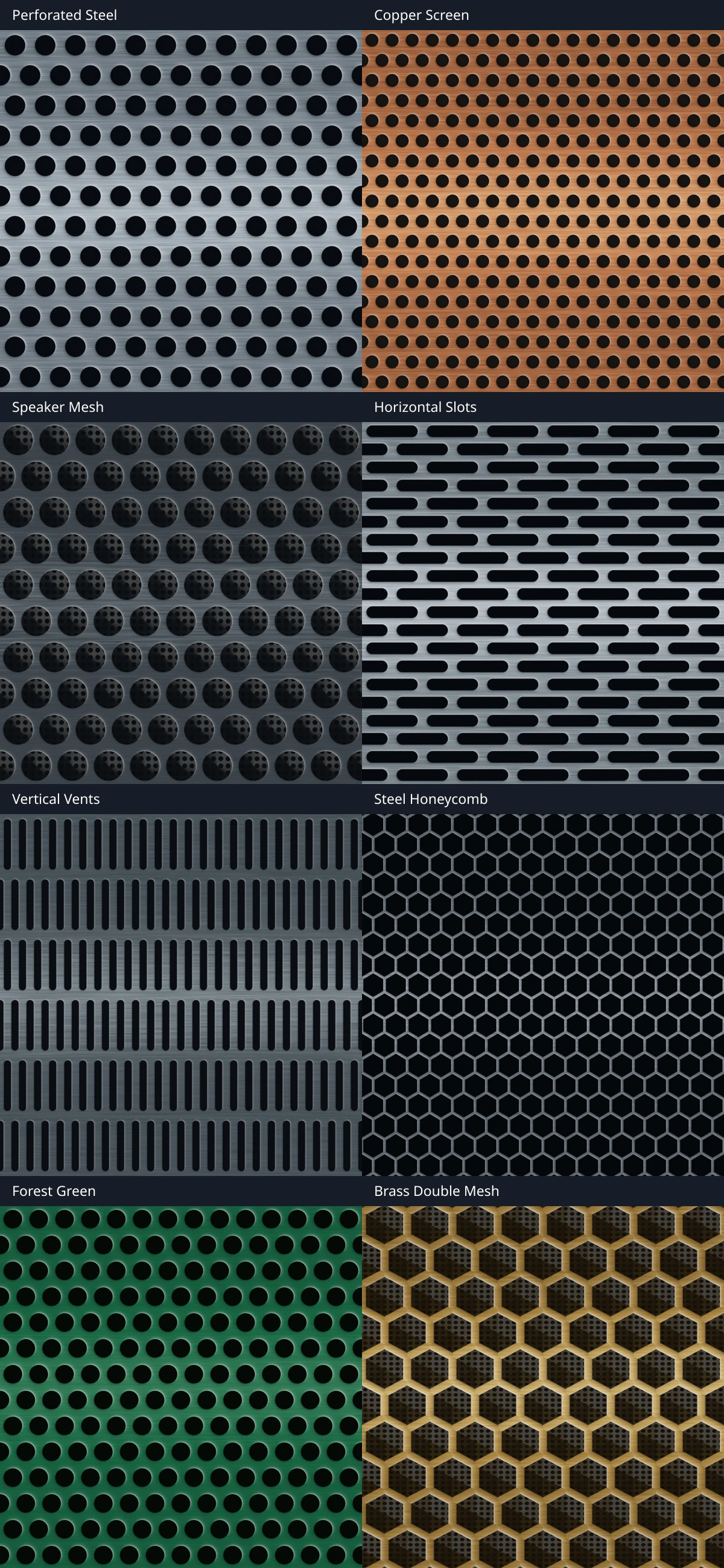
Eight designer presets
- Perforated Steel: staggered round holes in silver steel.
- Copper Screen: closely spaced copper perforations.
- Speaker Mesh: round openings on a 10 × 10 square-page layout, with fine mesh behind them.
- Horizontal Slots: rounded slots in bright steel.
- Vertical Vents: tall slots in darker metal.
- Steel Honeycomb: thin webs around hexagonal openings.
- Forest Green: painted green with round holes on a 14 × 14 square-page layout.
- Brass Double Mesh: large brass hexagons over fine mesh.
The full page is one seamless repeat. Use Seamless Preview to inspect it. Export PNG preserves the page dimensions and supports transparent holes. Snapshot Settings records the grille recipe.