Grain Facets
Fine stippled fades, curved petals and smoothly shaded fitted facets, all in one seamless engine.
Find Grain Facets – Seamless under Geometric & Optical, or search for Grain Facets in the pattern library. Start with one of eight designer presets, then change the shapes, shading and colors.
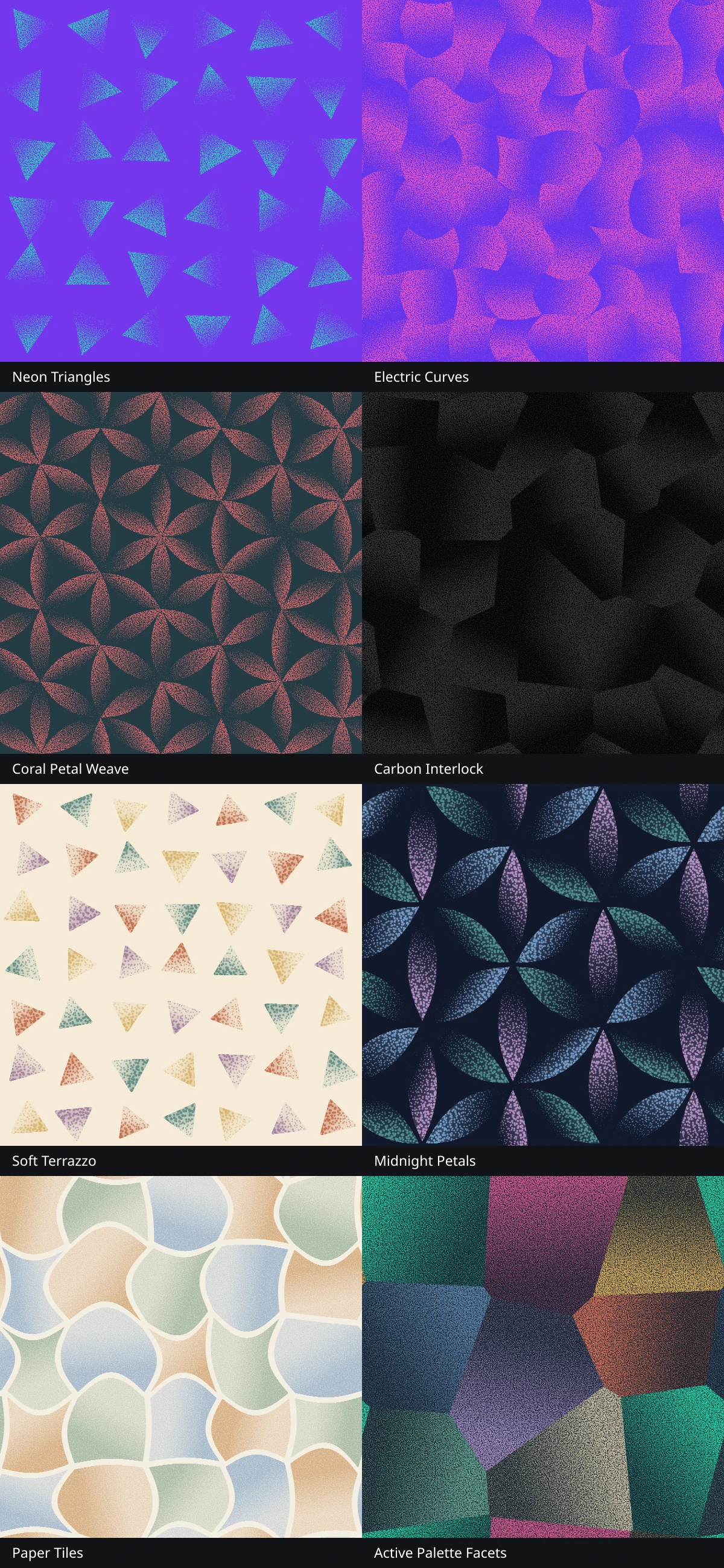
Four layouts
- Scattered triangles: separately rotated triangles with adjustable irregularity, spacing and rounding.
- Curved tiles: adjoining tiles with bowed edges. Increase spacing to separate them.
- Petal weave: a repeating three-direction rhombus lattice. Corner rounding changes the angular rhombi into pointed, curved petals. The column count rounds up to an even number so the staggered weave closes seamlessly.
- Irregular interlock: fitted polygon facets with shared edges. Layout irregularity changes the fit from orderly cells to a more unpredictable mosaic.
Shapes across repeat changes the overall scale. Higher values give smaller shapes; the petal weave divides each cell into three facets. Spacing shrinks each shape to expose more background. Corner rounding softens the corners. For tightly fitted interlocking facets, set both Spacing and Corner rounding to zero.
Layout irregularity varies triangle positions and sizes, curved tile corners, or interlocking cell centers. The regular petal weave does not use it. Triangle size scales triangles from 25–300% without changing their count or centers. The default 100% preserves the original size. Larger values can overlap neighboring triangles. This control is available in both Neon Triangles and Soft Terrazzo, and any other preset switched to Scattered triangles. Rotation variation is available for triangles. Layout seed reproduces the arrangement and grain; Shuffle layout chooses a new seed. Color changes retain the seed and geometry.
Grain and directional shading
Grain blend moves continuously from smooth shading at 0 to stippled shading at 100. Intermediate values combine a translucent smooth fill with fine dots. Grain size changes the dot scale in repeat-tile pixels, and Grain density changes how much of the surface the dots cover. Grain remains wrapped across both tile edges.
Shading direction rotates the fade. Direction variation varies the direction between individual shapes; at zero they all share the chosen direction. Fade contrast concentrates the transition from empty to filled. Minimum fill sets the faint end of the fade. Raise it to keep every shape visible, or leave it at zero to let the grain disappear into the background.
For subtle dark facets, try Carbon Interlock. For a clean smooth finish, lower Grain blend to 0. For airy printed shapes, try Neon Triangles, keep Minimum fill at 0, and adjust Grain size and Fade contrast.
Custom colors or the active palette
Custom colors provides 1–8 editable facet inks, each with a color picker and HEX field. Active palette takes up to eight colors spread across the palette bar; a shorter palette uses the available colors. Changing or importing the active palette recolors the facets automatically.
The selected inks are the full-strength colors. Shading, grain coverage and artwork opacity blend them with the background. Changing the background can therefore transform the whole design. Use transparent export to layer the same colored facets over a different surface.
Eight designer presets
- Neon Triangles: fine turquoise stipple on bright purple.
- Electric Curves: pink stippled fades across eight bowed tiles per row, with zero spacing.
- Coral Petal Weave: coral petals on deep blue-gray.
- Carbon Interlock: dark fitted facets with zero spacing and an 87% grain blend.
- Soft Terrazzo: muted multicolor triangles on warm paper.
- Midnight Petals: larger blue, lavender and teal petals.
- Paper Tiles: softly shaded pastel tiles with visible gaps.
- Active Palette Facets: larger irregular stippled facets using three shapes across the repeat, zero spacing and the palette bar.
Opacity, transparency and export
Transparent background removes the background fill and preserves the shading and grain transparency. The preview checkerboard is not exported. Artwork opacity fades the whole pattern. Repeat tile size sets a square repeat from 256–2048 pixels. Larger repeats contain more fine grain and take longer to generate; Grain Facets carries a Slower badge. The generated repeat is cached while unrelated controls change.
Use Seamless Preview to inspect the repeat. PNG export, saved recipes, origin placement and the global texture and paint overlays use the same controls as the other PatternSmith engines. Grain size is measured in tile pixels, so increasing the tile size gives finer grain relative to each shape.