Chromatic Mesh
Raised diamonds and beveled studs carrying broad, flowing fields of color.
Find Chromatic Mesh – Seamless under Geometric & Optical, or search for its name in the pattern library. The fine mesh and the larger color field are separate systems. Start with one of twelve designer presets, then explore the lattice, flow and relief.
Shape the fine mesh
Mesh density controls the number of lattice cells along the repeat axes. Higher values make smaller diamonds. Tile size sets how much of each cell the shape occupies: smaller values leave wider gaps, and 100% lets square tiles meet.
Mesh orientation offers 0°, 26.6°, 45°, 90° and 135° arrangements. These use integer lattice directions, so the mesh repeats seamlessly at every option. The diagonal and shallow arrangements contain more cells in the same repeat than the horizontal one.
Tile shape offers Square / diamond, Rounded tile and Circular stud. Square tiles become diamonds at 45°. Rounded tile reveals Corner rounding. Size modulation shrinks the tiles in darker parts of the field; set it to 0 for uniformly sized tiles. Changing colors leaves the lattice positions intact.
Control the broad color field
- Straight bands: ordered color bands without distortion.
- Flowing waves: bends the bands into broad currents.
- Interference ripples: combines periodic ripples into curved color contours.
- Soft clouds: blends several smooth fields into less regular patches.
Flow direction is available for bands and waves. Color cycles sets the number of color cycles in the field. Flow distortion bends the waves or reshapes the ripples and clouds. Color phase moves the selected colors through the field while retaining the lattice and dark-area positions.
Dark areas controls broad areas of reduced illumination. At 0, the field retains its full color brightness; higher values create deeper dark regions. Field seed reproduces the color-field arrangement, and Shuffle color field changes it without moving the underlying mesh.
Color source offers 1–8 Custom colors, Active palette, or Full spectrum. Each custom color has a picker and HEX input. Active palette samples up to eight colors spread across the palette bar, using fewer if the palette is shorter. Importing another palette recolors the field automatically.
For Custom colors and Active palette, Smooth gradient blends between the inks in a closed color loop, while Distinct color steps assigns one selected ink to each tile. Lighting and dark-area shading still modify the displayed colors. With one custom color, the field becomes a monochrome relief surface.
Bevel and lighting
Bevel width controls the width of the sloping edges around each face. Relief depth controls their lighting strength. The flat center and beveled sides respond separately, creating a raised tile. Light direction rotates the light in canvas space while the mesh keeps its orientation.
Highlight strength and Shadow strength have independent color controls. Use pale gold for warm metal highlights or cool blue for an icy surface. Glow adds a restrained halo in the gaps. Set Bevel width or Relief depth to 0 for a flat graphic mesh.
To inspect the relief clearly, try Graphite Relief or Champagne Tiles, then lower Mesh density for larger faces. To explore luminous color fields, start with Neon Current, Violet Wave or Spectrum Ripples.
Twelve designer presets
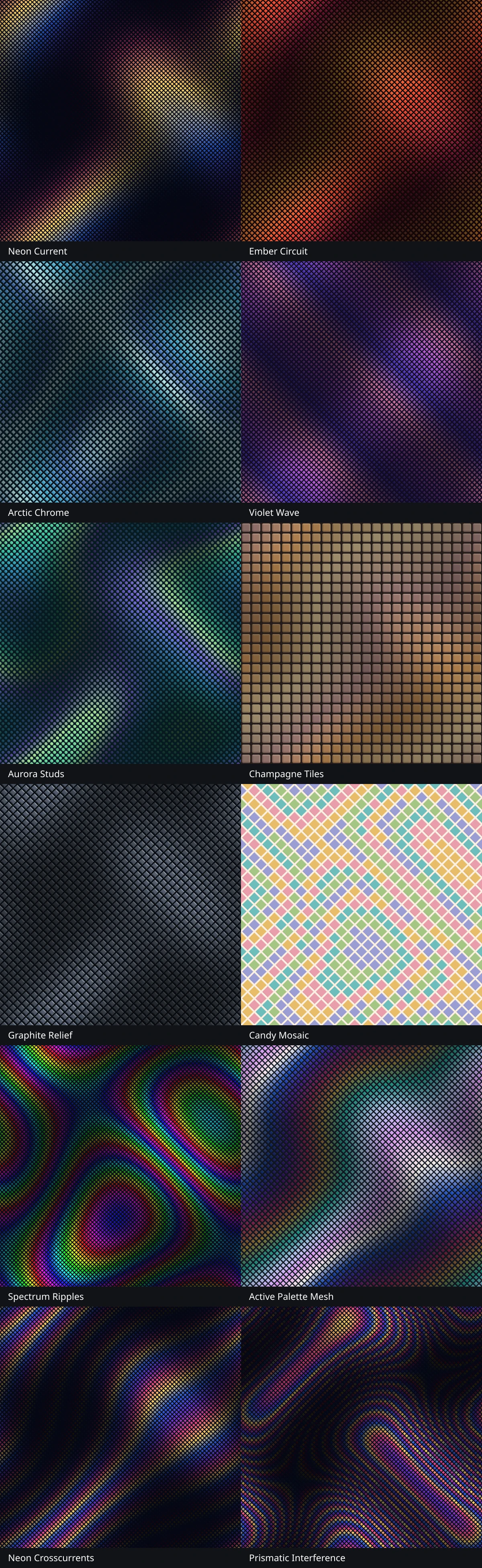
- Neon Current: blue, purple, pink and gold flowing through a fine diamond lattice.
- Ember Circuit: warm orange and crimson metallic diamonds.
- Arctic Chrome: icy blue and silver highlights over ripple fields.
- Violet Wave: violet and rose bands with a gentle halo.
- Aurora Studs: circular green, blue and violet studs.
- Champagne Tiles: larger rounded gold and taupe tiles.
- Graphite Relief: monochrome dark metallic diamonds.
- Candy Mosaic: larger pastel diamonds with distinct color steps.
- Spectrum Ripples: rainbow interference contours.
- Active Palette Mesh: flowing colors sampled from the palette bar.
- Neon Crosscurrents: a reconstruction of the fullscreen reference, using Neon Current colors, six flowing color cycles and phase 360°. Controls hidden by the preview retain Neon Current values.
- Prismatic Interference: the visible screenshot settings: interference ripples, six color cycles, 100% distortion, phase 360°, dark areas 90%, seed 140127 and size modulation 0. Hidden color and lighting settings retain Neon Current values.
Opacity, transparency and export
Transparent background removes the background between the tiles while preserving tile coverage and glow. Dark-area shading remains part of each tile. The preview checkerboard is not exported. Artwork opacity fades the assembled mesh.
Repeat tile size sets a square repeat from 256–2048 pixels. At very high mesh densities, use a larger repeat to retain the small bevel details. The pattern carries a Slower badge, and the generated mesh is cached for unrelated control changes.
The lattice, color fields, dark areas and glow wrap across both axes. Use Seamless Preview to inspect the repeat. PNG export, origin placement, saved recipes, and global texture and paint overlays follow the same workflow as the other PatternSmith engines.