Sway
Rounded lobes, tapered ribbons and soft steps, built from complementary curves.
Find Sway – Seamless under Geometric & Optical. Blue Cascade opens with shaded blue lobes, seven editable colors arranged by cycle, and a color sequence shift of 2. The original Blue Hour remains available. Try Ink Flicker for black-and-white ribbons, Soft Steps for pink and cream curves, or explore the other designer presets.
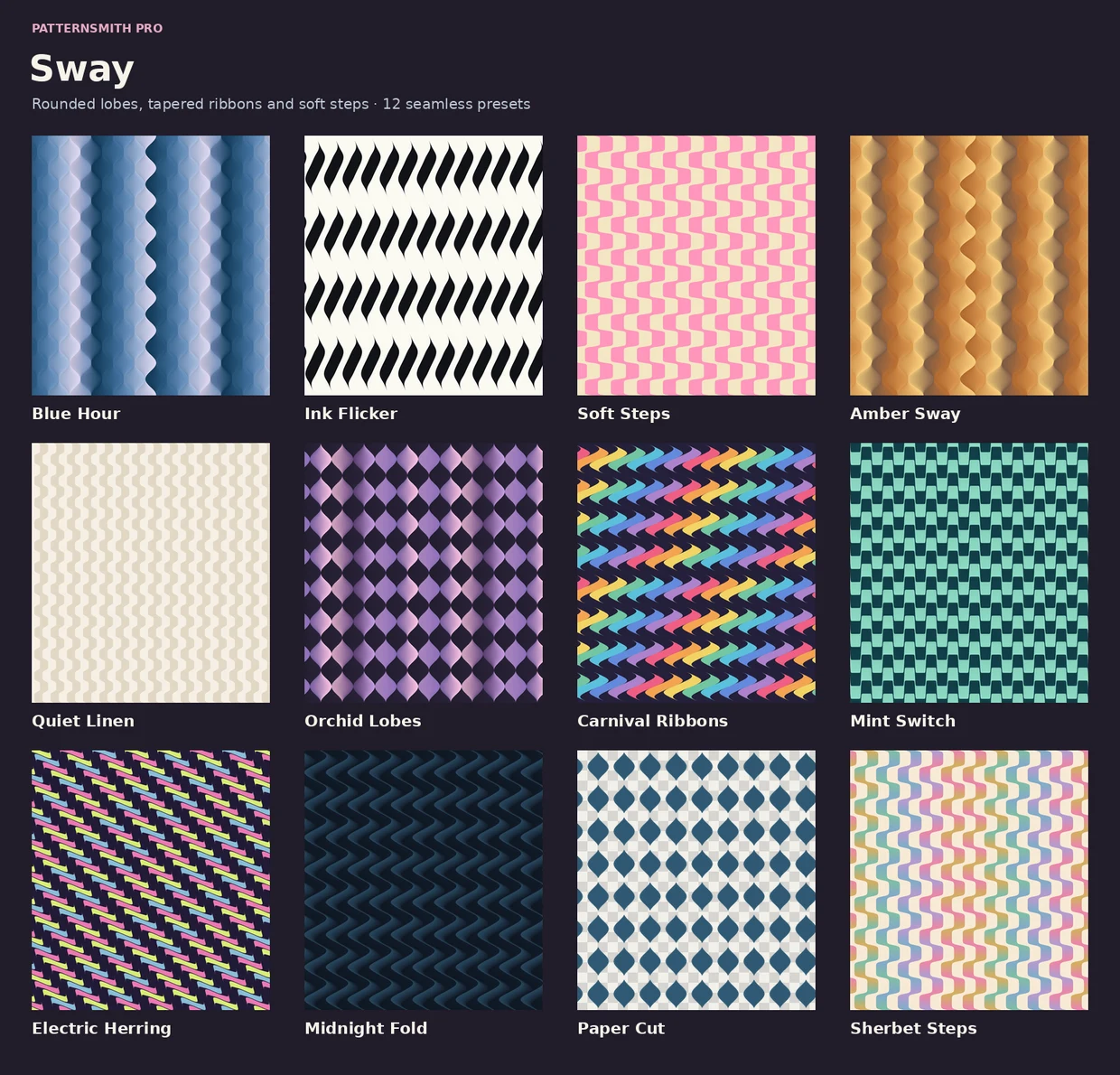
Shape and arrangement
Rounded Lobes uses swelling lenses. Tapered Ribbons adds adjustable tip sharpness. Soft Steps uses rounded transitions whose corner roundness you can change.
Columns across repeat controls the number of primary columns. Each has a complementary shape beside it. Cycles down repeat controls vertical repetition and advances in pairs so alternate cycle offsets remain continuous.
Primary shape width changes the balance between the two shape sets. Pinch narrows their ends; at full pinch and equal widths the shapes meet at points. Sideways curve depth bends the shared boundaries. Width and pinch always preserve matching edges.
Gap between shapes reveals the background. Alternate cycle offset adds a slower sideways motion. Repeat phase moves through one complete vertical repeat; 0° and 360° match. Mirror reverses the curves.
Upright and horizontal orientations rotate in quarter turns. The diagonal orientations use a square-compatible lattice, creating a denser repeat while preserving seamless boundaries.
Color and finish
Two colors assigns a primary and alternate ink. Editable colors offers one to seven editable inks. Active palette samples the chosen number of colors across the current palette. Rainbow supplies a colorful sequence.
Use Color both shape sets to spread the sequence through both sets, or keep the alternate shapes in one color. Assign colors by column, by cycle or in a diagonal sequence. Cycle-based arrangements may create deliberate color changes where a new cycle begins.
Shuffle colors changes the ink order while preserving the shape settings. Color sequence shift advances the sequence. Soft gradients blend each ink with the next; with a single ink, they blend toward the alternate color. Choose across shapes, along each cycle, or a diagonal blend. Gentle shading adds a light-to-dark sweep across each shape.
Transparency and export
Transparent background removes the alternate shapes and clears the gaps. The checkerboard in previews indicates transparency. PNG exports preserve it. Artwork opacity controls the remaining artwork as a whole.
Seamless Preview and Export PNG use the same square tile at your selected 256–2048 pixel resolution. Larger tiles take longer to calculate. Origin placement is normalized for preview and export. Recipes retain the shape settings, edited colors and palette selection.
The artwork is generated locally on your device. Reference photographs are not used as textures.