Quilts
A geometric patchwork studio with traditional blocks, modern compositions, and mixed samplers.
Start with one of twenty-four designer presets. Then choose the block family, its arrangement, the fabrics and the finish. Clean geometric color is just as intentional here as printed cloth and stitched seams.
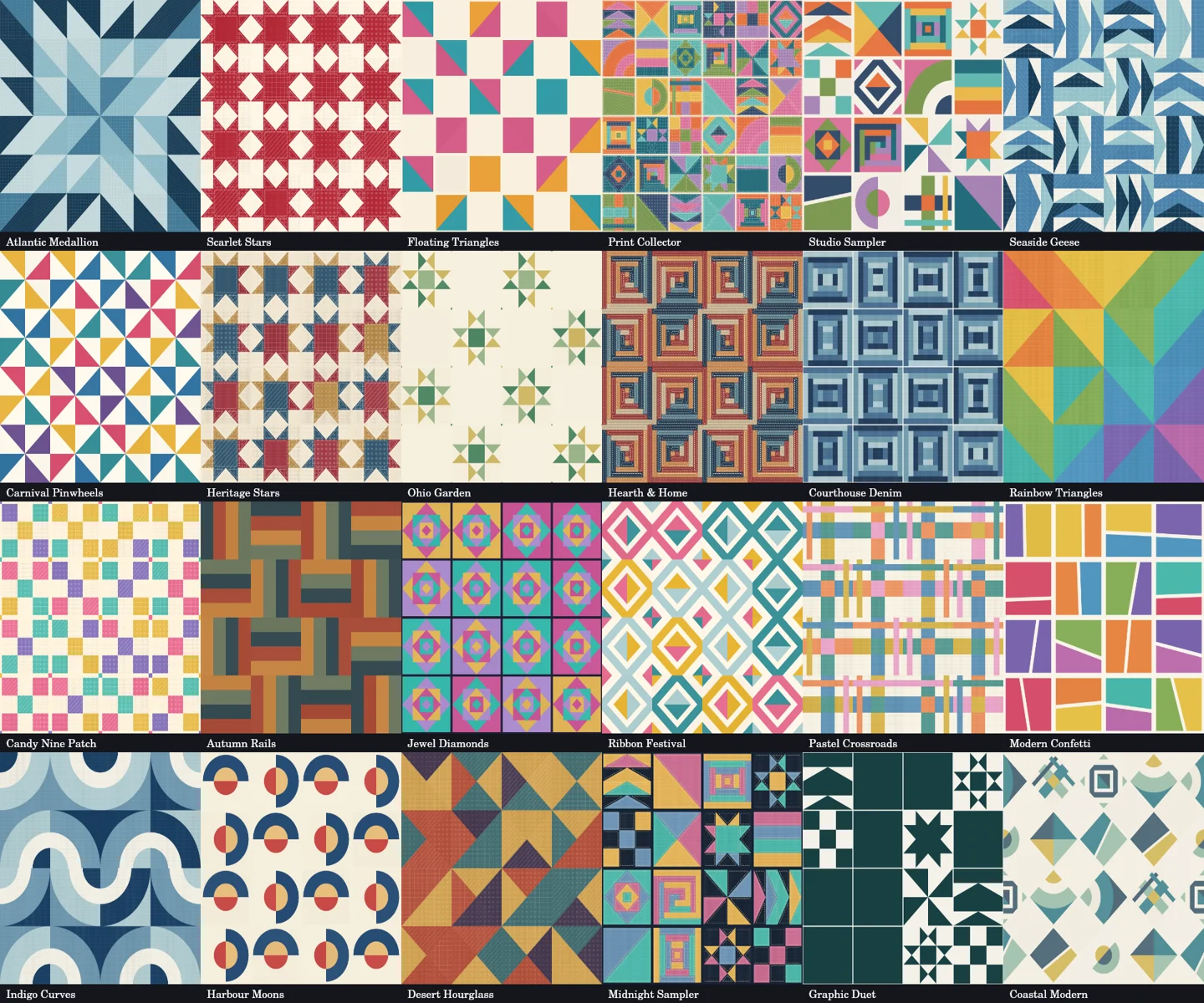
These are procedural geometric interpretations for making artwork and seamless backgrounds. This engine does not produce fabric cutting templates, sewing allowances, yardage estimates or assembly instructions.
A useful first exploration
- Choose Studio Sampler to see the range of block families.
- Try Carnival Pinwheels, Hearth & Home and Indigo Curves to compare triangles, strips and curved piecing.
- Change Block rotation to see secondary shapes appear between neighboring blocks.
- Switch Color arrangement between fabric roles, block colors and scrappy patchwork.
- Try Woven cloth or Printed fabrics, then enable stitches if you want a textile finish.
- Open Seamless Preview and export a PNG when you find a combination you like.
Sixteen block families, plus a sampler
Half-square triangles
Two triangles divide each block. Rotation can create diamonds, zigzags, alternating facets, or larger medallion compositions.
Pinwheels
Four half-square units turn around the block center. Keep all blocks alike for a regular field, or mix rotations and fabric colors.
Flying Geese
Stacked triangular units form directional runs. Alternating rotations creates zigzags and woven-looking arrangements.
Sawtooth Star & Ohio Star
Two distinct star constructions: triangular points around a square center, or a nine-patch setting with hourglass-style side units.
Nine Patch
A three-by-three grid alternates light ground squares and colored fabric squares. Sashing and cornerstones reinforce the patchwork structure.
Log Cabin & Courthouse Steps
Strip-built blocks grow around a center. Log Cabin spirals around it; Courthouse Steps builds opposing bands. Detail controls the strip count.
Rail Fence
Parallel strips become zigzags and interlocking grids when neighboring blocks turn. Detail changes the number of rails.
Square in a Square
Nested squares and diamonds change orientation as they step inward. Detail controls the number of layers.
Ribbon Diamonds & Crossroads
Modern geometric blocks built from nested diamond bands or crossing rectangular strips. Rotation creates larger connecting structures.
Modern Slices
A slanted, light divider separates colored shapes. The quilt seed varies the cut within each block.
Quarter-circle Blocks & Sun & Moon
Curved piecing brings arcs, circles and semicircles into the collection. Four-way rotations can turn isolated arcs into larger circular arrangements.
Hourglass
Four triangles meet at the center of the block. Consistent roles or scrappy colors produce very different visual rhythms.
Sampler collections and arrangement
Mixed sampler chooses from traditional blocks, modern geometry, or both. The quilt seed changes its arrangement and color assignment. A four-by-four all-family sampler has room for every family; denser grids repeat the collection. Smaller grids show a subset.
All alike leaves every block in its original orientation. Alternating quarter turns creates a checkerboard of turns. Four-way rotation repeats four orientations. Seeded mixed rotations varies them reproducibly. Around a medallion turns blocks according to their position around the lattice center.
Alternate with plain blocks replaces half the blocks with ground fabric, giving intricate designs more breathing room. On point turns the block setting diagonally while preserving the repeat. It covers more visible blocks than the straight setting at the same lattice density.
Colors and fabric roles
| Control | What it changes |
|---|---|
| Palette source | Use 1–8 custom HEX colors, the active palette, Rainbow or Tone on Tone. Custom swatches are retained when switching sources. |
| Consistent fabric roles | The same structural piece uses the same palette role across blocks. |
| Color by block | Each block begins at a different palette position. |
| Scrappy patchwork | Individual pieces receive seeded palette assignments. |
| Diagonal / medallion flow | Color assignment follows diagonal bands or distance from the center. |
| Color the light / ground pieces | Includes the normally light pieces in the palette assignment. Disable it to retain a strong ground-fabric contrast. |
| Ground fabric | The light pieces and plain alternate blocks. The main Background chip controls this color too. |
| Sashing color | The independent strips between blocks. Cornerstones optionally add colored squares at their intersections. |
Fabric, patch edges and quilting
Clean geometric color uses flat color plus optional patch variation. Woven cloth adds a fine procedural weave. Printed fabrics assigns dots, stripes, checks or small petal-like prints to pieces. Mixed fabric collection combines prints and woven pieces. Print contrast and density control their visibility.
Patch seam width adds colored edge lines. Show quilting stitches adds dashed thread lines inset from patch boundaries, with independent thread color, width and inset. Very narrow pieces may have little room for an inset stitch. At low export resolution, fine detail can merge; export larger or reduce print density.
The global Texture Overlay and Paint Stroke Overlay remain available for additional surface character.
Seamless repeat, saved recipes and export
Blocks, color choices, prints and orientations wrap on an even lattice. Both straight and on-point settings use a true repeating field. Sashing is shared across opposing edges; there is no outer border added to the tile.
The export tile is 128–2400 pixels. Export size changes resolution, preserving composition. Editing origin positions are normalized for preview and export. Saved recipes retain block settings and the active-palette colors used by the quilt. Importing another palette updates an active-palette design.
All geometry and fabric detail are generated on your device. The reference photographs are not embedded or used as textures.