
Quick start
Most jobs take less than a minute once the palette is loaded.
Where Palette JSON Sorter fits in Green Macaroni
Palette JSON Sorter is the housekeeping companion to Palette Grabber.
Palette Grabber creates and stores reusable color palettes. When a palette grows large, or when its colors need a more useful sequence, export the palette as JSON and open it here.
Palette JSON Sorter lets you reorganize those swatches without manually recreating their color values. Export the cleaned JSON and bring it back into Palette Grabber, where the palette can return to your wider Green Macaroni color workflow.
Swatches and palettes
Two color terms make the whole workflow easier to understand.
Palette JSON Sorter mostly works at the swatch level. It changes the order, names and individual color values inside one loaded palette.
Loading palette JSON
The parser accepts several practical JSON structures instead of requiring one exact file shape.
| Accepted structure | What Palette JSON Sorter does |
|---|---|
| Flat swatch array | Accepts a JSON array such as [{...}, {...}] and treats each object as one swatch. |
| Palette Grabber format | Accepts an object containing name and a swatches array, preserving the palette name for editing and export. |
| Alternative array keys | Also recognizes swatch arrays stored under colors, colours, palette or items. |
What a swatch needs
The parser prefers a swatch's hex value when present, but it can also build HEX from numeric r, g and b values. If a swatch has no explicit name, it can use a Pantone field as a name, or fall back to a simple Color 1, Color 2 sequence.
The swatch list
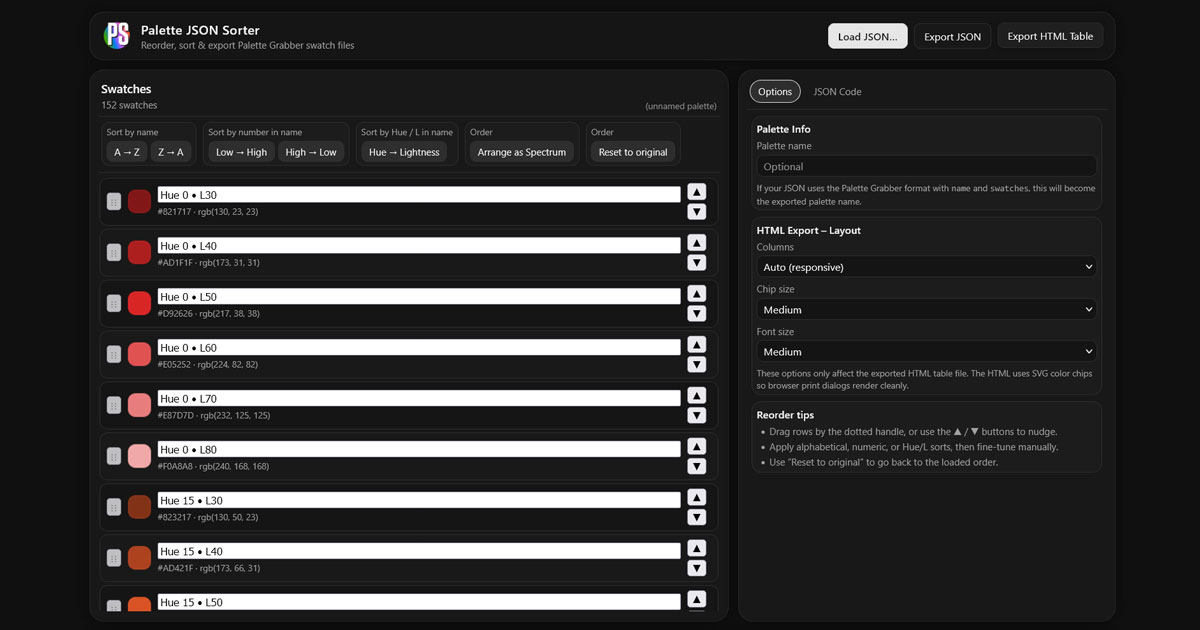
Every loaded color becomes one visual row with its name, actual color and digital values.
| Part | What it does |
|---|---|
| Dotted handle | Grab ⋮⋮ to drag the row to a new position. Dragging is armed only from the handle so normal text editing is not accidentally turned into a drag. |
| Color chip | Shows the current color. Double-click it to open the Color Mixer & Namer. |
| Name field | Edit the swatch name directly. Press Enter to finish the text edit. |
| HEX / RGB line | Displays the normalized color as HEX plus rgb(r, g, b). |
| ▲ / ▼ | Nudge a swatch up or down one row at a time. This is also a useful alternative to dragging on touch devices. |
Clicking or tapping a row selects it visually. Reordering changes the palette's current order immediately, and the JSON Code view stays synchronized unless you are in the middle of manually editing that code.
Sorting and arranging swatches
The app provides four different ideas of “order,” because useful color order depends on how the palette was named and how you intend to use it.
| Sort | Behavior |
|---|---|
| A → Z | Sorts swatch names alphabetically, case-insensitively. |
| Z → A | Sorts swatch names in reverse alphabetical order. |
| Low → High | Finds the first number inside each swatch name and sorts numerically. Names with no number move after the numbered names. |
| High → Low | The same first-number sort in descending order. |
| Hue → Lightness | Reads structured names such as Hue 90 • L40, sorts by Hue first and then Lightness. Names that do not match the pattern are left after matching swatches. |
| Arrange as Spectrum | Uses the swatches' actual RGB colors, not their names. Colored swatches sweep by hue, then lightness; low-saturation neutrals are placed at the end. |
| Reset to original | Restores the row order from the JSON as it was originally loaded. |
Color Mixer & Namer
Double-click a swatch's color chip when the color itself needs correcting, not just its position.
| Control | Purpose |
|---|---|
| HEX | Type a six-digit HEX color directly. |
| Color picker | Use the browser's native color picker to choose a replacement color visually. |
| Hue | Moves around the color wheel from 0 to 360 degrees. |
| Sat | Adjusts saturation from muted/grey to intense color. |
| Light | Adjusts lightness from dark to light. |
| Name | Give the corrected swatch any descriptive name you want. |
| Auto-name | When enabled, builds a structured name such as Hue 90 • L40 from the current HSL color. Those names work naturally with the Hue → Lightness sort. |
| Copy HEX | Copies the current HEX value to the clipboard. |
| Apply to swatch | Writes the new RGB, HEX and optional name back into the selected swatch. |
Before the mixer opens, the app stores one state snapshot. Press Z after a mixer edit to restore that snapshot.
Palette name
A loaded palette can be given a human-readable name before export.
If the source is already a Palette Grabber-style object with name and swatches, the name field edits that palette name. If the source is a plain flat array, the field still becomes available after load.
{ name, swatches: [...] } format. Leave the palette name blank if you specifically need to keep a flat-array export shape.Named JSON exports also receive a friendlier filename derived from the palette name, with unsafe filename characters removed.
JSON Code view
The visual list and the raw JSON are two views of the same current palette.
Open the JSON Code tab to inspect the exact JSON that the app is prepared to export. You can also edit it directly.
| Command | Use it when |
|---|---|
| Apply JSON to list | You intentionally edited the raw JSON and want the visual swatch list rebuilt from those changes. The same parser rules used for file loading apply here. |
| Reset JSON to current state | You changed the code but want to discard those un-applied edits and regenerate the code from the current visual list. |
Export JSON
The exporter tries to preserve the useful structure of the file you loaded while updating the swatches you changed.
| Source | Export behavior |
|---|---|
| Flat array, no palette name | Keeps the flat-array shape. Existing swatch fields are preserved where possible, while current name, HEX and RGB values are written back. |
| Flat array, palette name supplied | Exports a Palette Grabber-style object with name plus a swatches array containing each swatch's name and RGB values. |
Palette object with swatches | Preserves the original object and existing swatch fields where possible, while updating the palette name, order, name, HEX and RGB values. |
The output is formatted JSON with two-space indentation, making it readable both by software and by a person who needs to inspect the data.
Export HTML Table
Create a standalone color reference that can be opened in a browser, printed or saved as a PDF through the browser's print dialog.
| Option | Choices |
|---|---|
| Columns | Auto responsive, or a fixed 2, 3, 4, 5 or 6 columns. |
| Chip size | Small, Medium or Large. |
| Font size | Small, Medium or Large. |
Each exported card contains the swatch name, HEX value and RGB values. The color chips are inline SVG rectangles rather than fragile CSS-only color blocks, which helps browser print dialogs render them cleanly.
The exported page includes the generation date/time and the total swatch count. It is self-contained, so it can be archived with a project or sent to someone who does not have Palette JSON Sorter open.
Color Theory Basics
The built-in help panel explains the three HSL ideas used by the sorter and mixer.
Hue 90 • L40 turn those color properties into sortable labels, making orderly shade ladders easy to rebuild.Open Color Theory Basics from the app footer whenever you want the short in-app refresher.
Mobile and smaller screens
The same palette tools remain available when the interface collapses to a narrower layout.
- Below the desktop two-panel width, the Options/JSON panel moves above the swatch list rather than squeezing both columns.
- The header controls wrap on phones so Load and export commands remain reachable.
- The Color Mixer becomes a one-column layout on very narrow screens.
- For precise reordering on touch devices, the ▲ and ▼ row buttons are often easier than drag-and-drop.
- Because the input is a JSON file rather than a photograph, the app does not need camera access.
Your palette files stay in the browser
Palette JSON Sorter reads and writes the working palette locally.
Load JSON… uses the browser's local file reader. The current build parses the selected text in the page rather than uploading the palette file to a Green Macaroni server.
JSON and HTML exports are generated in the browser as downloadable files. Nothing in the current palette-editing workflow requires an account, sign-in or server-side storage.
Keyboard and control shortcuts
The current build keeps the global shortcuts deliberately small so text editing remains predictable.
| Control | Action |
|---|---|
| B | Open Load JSON. |
| C | Clear the current palette and return the app to its unloaded state. |
| Z | Undo the most recent mixer-based change if a mixer snapshot is available. |
| Enter | Finish editing a swatch name field and remove focus from the field. |
| Esc | Close the Color Theory Basics modal when it is open. |
| Double-click color chip | Open the Color Mixer & Namer for that swatch. |
| Drag dotted handle | Move a swatch to a new position in the list. |
| ▲ / ▼ | Move a swatch one position up or down. |
Global B, C and Z shortcuts are ignored while you are typing in an input or textarea, so they do not interfere with swatch names or raw JSON editing.
Troubleshooting
Most problems come from the source JSON shape, the distinction between name-based sorts and color-based sorting, or the difference between visual and raw-code edits.
The file will not load
Make sure it is valid JSON and that it contains either an array of swatches, an object with a swatches array, or one of the supported alternative array keys: colors, colours, palette or items.
Numeric sorting looks strange
The sorter uses the first number found in each swatch name. Check the names if the number you intended to sort by is not the first numeric value.
Hue → Lightness does not affect some rows
That sort reads structured names such as Hue 90 • L40. Swatches without a matching Hue/L pattern are placed after the swatches that do match.
I want the actual colors arranged visually, regardless of their names
Use Arrange as Spectrum. It derives hue, saturation and lightness from the swatches' RGB data and places neutral colors at the end.
I changed the JSON Code but the list did not change
Raw code edits are intentionally not live. Press Apply JSON to list when you are ready to rebuild the visual palette from the edited JSON.
I want to abandon my raw JSON edits
Press Reset JSON to current state. That regenerates the editor from the current visual list.
Z did not undo my sort or drag
The current undo stores only the snapshot created before a Color Mixer edit. Use Reset to original to recover the original loaded order, or apply another sort to reorganize the list.
My flat-array export became a Palette Grabber palette object
That happens when you give a flat-array source a palette name. Clear the palette name before export if you specifically want to preserve the flat-array shape.
I need a paper or PDF color reference
Use Export HTML Table, open the downloaded HTML file in your browser, then print it or choose your browser's Save as PDF option.